
Download DVD Cache – free lightweight media organizer for Mac
Overview
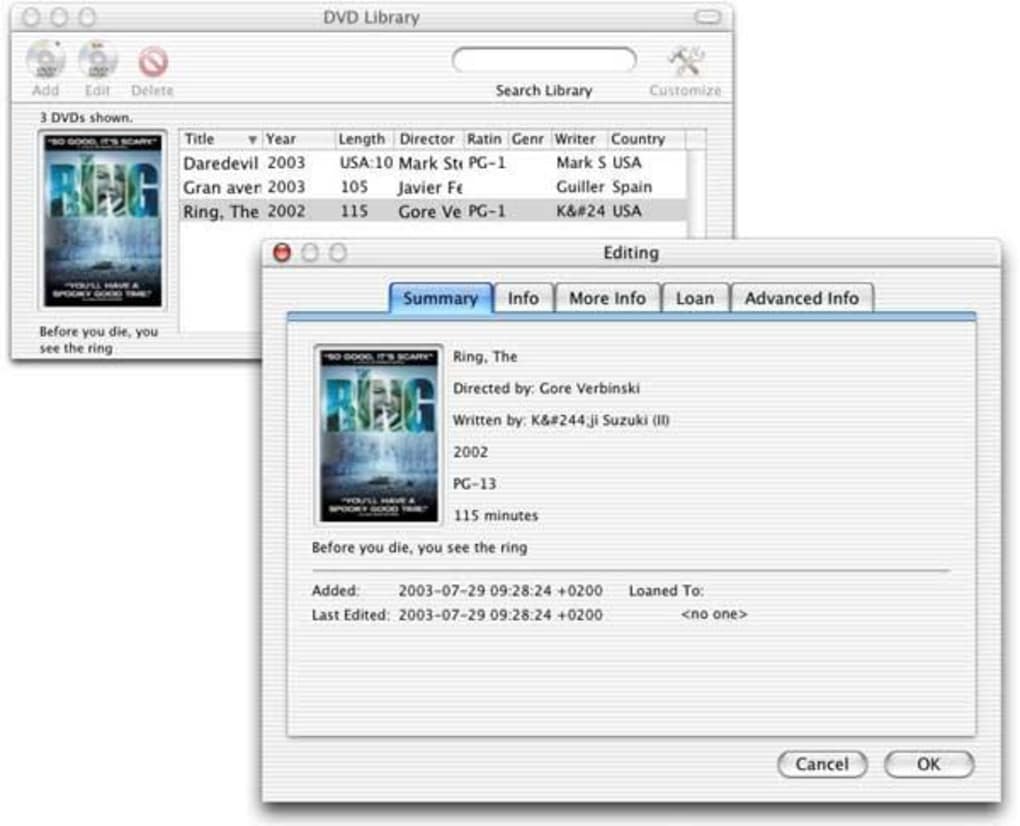
DVD Cache is a compact cataloging utility created by Humantrained, specifically tailored for macOS users who still cherish physical media collections. Whether you own a stack of DVDs, a bookshelf full of novels, a handful of CDs, or a growing library of video games, DVD Cache offers a single pane of glass to keep every item organized, searchable, and easily accessible. The application’s core strength lies in its seamless integration with IMDb, allowing users to pull accurate titles, cast lists, genres, and release years with just a click.
Beyond basic metadata, DVD Cache provides dedicated fields for purchase price, source, lending history, and view counts, making it ideal for collectors who want to track both the monetary and sentimental value of their assets. The interface harkens back to classic Mac utilities—clean, compact, and deliberately uncluttered—so there’s no steep learning curve for those familiar with older Mac tools. While the UI may feel dated compared to modern cloud‑based services, its lightweight footprint ensures fast performance even on legacy hardware.
Export options let you back up collections as HTML files for offline viewing or sharing with friends. In short, DVD Cache delivers a pragmatic, no‑frills solution for anyone looking to build a personal media inventory without the overhead of subscription‑based platforms.
Core Features & Smart Cataloging
- IMDb Lookup – automatic import of title, cast, genre, and release year.
- Multi‑media support – catalog DVDs, Blu‑rays, CDs, books, and video games.
- Lending tracker – integrates with macOS Address Book to record borrower details and due dates.
- Purchase & valuation fields – store price, vendor, and acquisition date for each item.
- Viewing statistics – count how many times a DVD has been watched or a game played.
- Smart collections – create dynamic groups using filters such as genre, year, or loan status.
- Export to HTML – generate static web pages for backup or sharing.
- Compact UI – a single‑window layout that loads instantly on older Macs.
- Free of charge – no hidden fees, in‑app purchases, or subscription requirements.
- Secure data handling – all information is stored locally on your Mac.
The feature set is deliberately focused on the essentials of media management. By leveraging IMDb’s extensive database, DVD Cache eliminates the tedious manual entry that plagues many cataloging apps. Users can quickly pull in accurate information, then enrich each entry with custom fields such as purchase price, lender name, or personal notes.
The lending tracker shines for families or friend groups who frequently swap DVDs and games; thanks to the Address Book integration, you can assign a contact to each loan and set reminders for returns. Smart collections work like dynamic playlists—filter by “Not yet watched,” “Borrowed,” or “Science Fiction” and watch the list update in real time. Though the UI is minimalist, it provides intuitive shortcuts for adding new items, editing metadata, and navigating between collections.
Exporting to HTML ensures you aren’t locked into a proprietary format; a simple double‑click opens a browsable catalog in any web browser. Overall, DVD Cache’s feature list strikes a balance between depth and simplicity, making it an excellent choice for collectors who value control without the clutter of feature‑bloat.
Installation, Usage & Compatibility
Step‑by‑step installation
Installing DVD Cache on macOS is straightforward. Begin by downloading the .dmg file from the official Humantrained website. Once the download completes, double‑click the .dmg to mount the installer volume. Drag the DVD Cache icon into your Applications folder, then eject the installer. macOS may warn you that the app is from an unidentified developer; simply open System Preferences → Security & Privacy → General, and click “Open Anyway.” The app launches with a brief welcome wizard that asks if you’d like to import existing CSV files or start a fresh catalog. No admin password is required unless you choose to install it for all users on the machine.
First‑time use and workflow
Upon first launch, you’ll be greeted with a clean library view and a prominent “Add New Item” button. Clicking this opens a form where you can either type a title manually or use the IMDb lookup field. When you type a few characters, the app queries IMDb and presents a dropdown of matching titles; selecting one populates the metadata automatically.
You can then fill in additional fields such as purchase price, source, and lending status. Items are organized into collections on the left sidebar; you can create custom collections like “Family Favorites” or let the smart collection engine handle dynamic groups. To track a loan, select an item, click the “Lend” button, and choose a contact from the Address Book.
The app records the borrower’s name, loan date, and optional due date. All changes are saved instantly to a local SQLite database, ensuring you never lose data due to an unexpected shutdown.
Compatibility and system requirements
DVD Cache is optimized for macOS 10.12 Sierra and later, though it runs most smoothly on macOS 10.14 Mojave through macOS 13 Ventura. Because the app is built with native Cocoa frameworks, it consumes minimal RAM (typically under 100 MB) and has a tiny disk footprint of less than 20 MB. Users on older hardware—such as MacBook Air models from 2012—report no performance issues, making DVD Cache a reliable choice for legacy systems that cannot support heavyweight cataloging suites. The software does not have Windows, Android, or iOS versions; it remains a Mac‑only solution, aligning with its focus on the traditional desktop cataloging experience.
Pros, Cons & Frequently Asked Questions
Pros
- Free and fully functional without hidden fees.
- Fast IMDb integration for accurate metadata.
- Robust lending tracker linked to macOS Address Book.
- Lightweight design runs well on older Macs.
- Smart collections enable dynamic filtering.
Cons
- UI looks dated compared to modern macOS apps.
- No native Windows or mobile version.
- Limited cloud sync; data is stored locally only.
- Development updates have slowed in recent years.
- Export format limited to HTML; no CSV or JSON options.
FAQ
Can I import an existing media list into DVD Cache?
Yes. DVD Cache allows you to import CSV files via the File → Import menu. The columns should match the app’s fields (title, genre, price, etc.) for a smooth import.
Is there a way to back up my catalog?
All data is stored locally in a SQLite database inside the application’s support folder. You can back up this file manually, or use the built‑in Export to HTML feature for a readable backup.
Does DVD Cache support barcode scanning?
No, the current version does not include barcode scanning. Items must be added manually or via IMDb lookup.
Can I share my collection with friends?
You can export your library as an HTML file and send it to anyone. Recipients can open the file in any web browser, but they won’t be able to edit the catalog directly.
Is there any cloud sync or iCloud support?
Currently DVD Cache does not offer cloud synchronization. Users who need cross‑device access must rely on manual backups or third‑party file‑sync services.
DVD Cache delivers exactly what its tagline promises: a lightweight, free cataloging solution for macOS users who still value physical media. Its strongest assets are the IMDb lookup and the seamless lending tracker that taps into the native Address Book. While the UI may feel a decade old and there is no cloud sync, the application remains fast, reliable, and perfect for users with older Macs. For anyone looking to organize DVDs, books, CDs, or games without paying for a subscription, DVD Cache is still a solid pick.
Conclusion & Call to Action
In a world where streaming dominates, DVD Cache reminds us that physical collections still deserve proper care. Its free price tag, IMDb integration, and lending features make it a practical tool for collectors, families, and anyone who likes to keep track of what they own. Although it lacks modern polish and cloud capabilities, the app’s stability on legacy macOS versions is a compelling reason to give it a try. If you’re ready to bring order to your DVD, book, or game shelves, simply download DVD Cache today and start building a searchable, searchable library in minutes.







